
The signature layer for modern teams
Every email your team sends is a billboard
Design one on-brand signature for the whole company. Everyone sets up in minutes — and you keep every logo, banner, and campaign link current from one dashboard, even in emails already sent.
$5/mo covers your first 10 people · Gmail, Outlook & Apple Mail
Renders correctly in the clients your team actually uses
Step 01 · Admins
Design it once, in a real builder
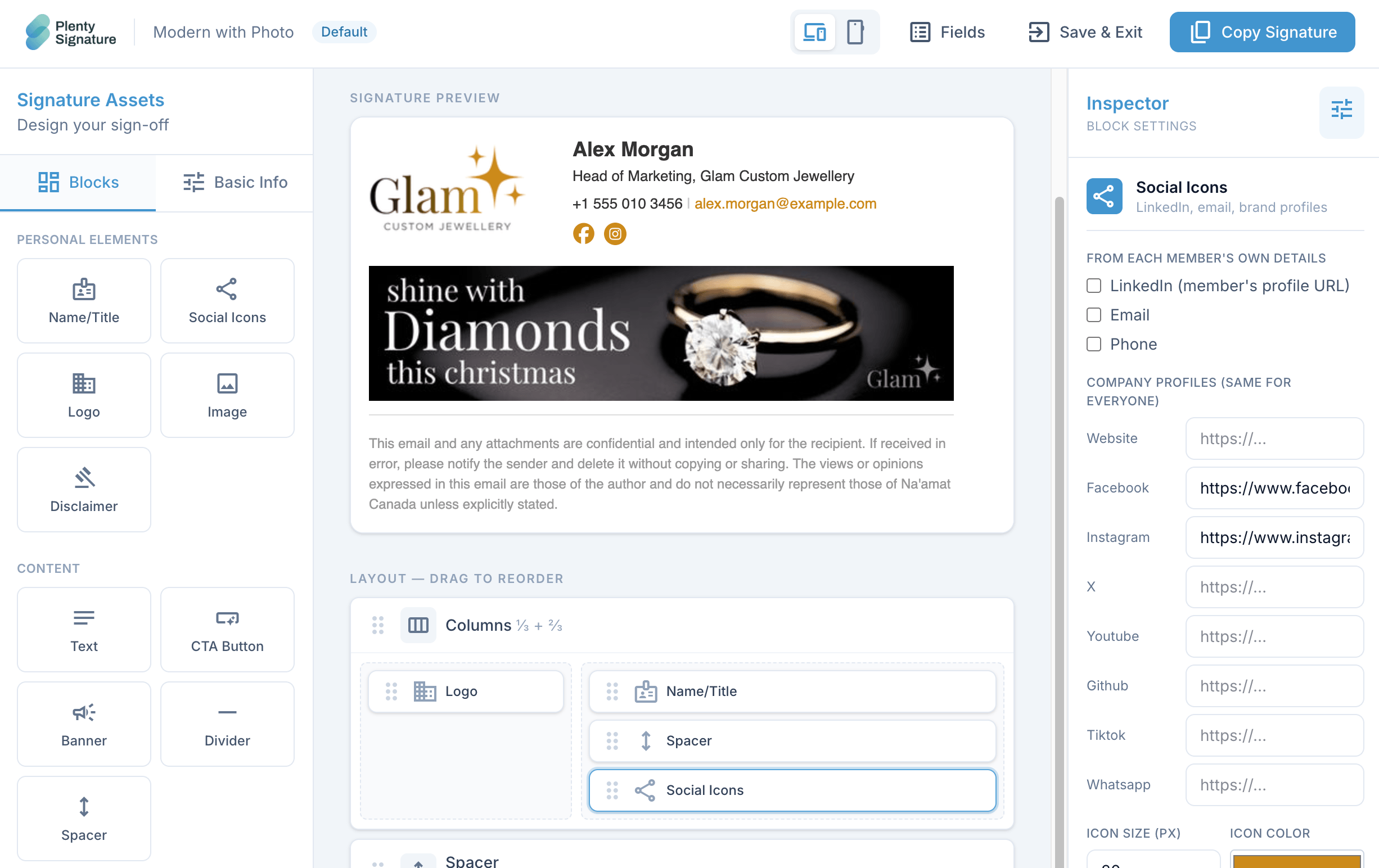
Drag blocks — logo, details, social icons, banner, CTA — into a live preview. No HTML.
- Lock the fields that must never change; require the ones that must always be filled
- Live preview with per-client rendering warnings
- One template governs the whole team's look
Step 02 · Everyone else
Fill in your details. Copy. Done.
No design tools, no HTML. Two minutes, then never again.
- Teammates add name, title, and photo — nothing they can break
- One button copies a perfect signature to the clipboard
- Paste into Gmail, Outlook, or Apple Mail with per-client steps on the page
Step 03 · Live
Swap the campaign. Everyone updates.
Signatures reference permanent URLs you control. Launch a new campaign and the banner changes everywhere it already lives — even in emails sent weeks ago.
- One swap updates every signature already pasted — no re-send, no reminder
- Schedule a banner to go live and retire on set dates
- Full history with one-click revert to any past creative
Controlled in every way
Your branding is safe. Your team can't go off-script.
A signature system, not a template file.

Old emails update themselves
Swap the image behind a permanent URL and every signature already pasted picks it up. Full history, one-click revert.

Locked to your brand
Per template, make each field editable, required, locked to a fixed value, or hidden. Layout is never editable by members.

Safe in every inbox
Table layout, inline CSS, PNG icons — boring on purpose, so it renders in Outlook and Gmail alike.

Scheduled campaigns
Queue a banner to go live on a date and retire on another. No re-paste, no reminder to anyone.

Privacy-first click tracking
Counts clicks and timestamps only — deliberately no IP addresses, no user agents, nothing about the person clicking.

Seats that follow your team
Invite someone and they set up in two minutes; deactivate and they lose access at once. Billing adjusts automatically.
Logo, details, social, banner, CTA, disclaimer, and more — no HTML.
LinkedIn, X, Instagram, email, phone, website, and beyond.
Campaigns and banners update behind stable URLs on their own.
Everything included
One system, every part of the signature
No add-ons, no feature tiers — the whole toolkit ships with your workspace.
Pricing
One plan, priced by headcount
Every feature included. Seats adjust automatically as people join and leave — you never manage licenses or pick a tier.
- Full drag-and-drop builder, every block type
- Stable URLs, scheduled campaigns & click tracking
- Unlimited templates & members
- Billing follows your team size automatically
What it costs in practice
Live prices from our billing engine — no asterisks.
Frequently asked questions
Do already-sent emails really update?⌄
Yes — that's the point of stable URLs. The signature references a permanent image link we host; when you swap the creative or revert to an old one, mail clients load the new image the next time the message is viewed. Click-through links work the same way: the URL never changes, only where it sends people.
Does it work with Gmail and Outlook?⌄
That's what the output is engineered for: table-based layout, inline styles, explicit image sizes, PNG icons. The builder even warns you when a setting won't render in a specific client.
How do people install their signature?⌄
They open their signature page, fill in their details, and press Copy — it lands on the clipboard as rich text, ready to paste into Gmail, Outlook, or Apple Mail. Per-client instructions are right on the page.
What can members change — and not change?⌄
Only what you allow. Per template, each field can be editable, required, locked to a value you set, or hidden. Layout and branding are never editable by members.
Do you track my recipients?⌄
No. Click tracking counts clicks and timestamps only — we deliberately store no IP addresses, no user agents, nothing about the person clicking.
Signatures that work for you, not against your brand
Design your signature, invite the team, and own every inbox impression.
$5/mo covers your first 10 people · seats adjust automatically